
The Hidden Internet: Tools Only Power Users Know About

For most people, the internet means a handful of familiar websites, search engines, and social media platforms. But beneath the everyday browsing experience lies a much deeper layer of powerful tools used by researchers, developers, digital creators, and tech enthusiasts. These tools aren’t necessarily secret—they’re just not widely known outside of power-user circles. From advanced search techniques to productivity platforms and data exploration tools, the hidden side of the internet can help you work faster, learn more efficiently, and discover information you never knew existed.
Advanced Search Techniques

Most people type a few keywords into a search engine and hope for the best. Power users, however, know how to use advanced search operators to find exactly what they need. By adding specific commands to searches, users can filter results by file type, domain, date, or exact phrases. This makes it easier to locate academic papers, PDFs, research reports, or niche information buried deep within the web. Learning a few of these techniques can dramatically improve how quickly you find reliable and relevant information online.
The Power of Web Archiving
The internet constantly changes, and websites can disappear overnight. Power users often rely on web archiving tools that capture and preserve snapshots of websites over time. These archives allow you to view older versions of pages, retrieve information that has been deleted, or track how websites have evolved. Researchers, journalists, and digital historians frequently use these tools to verify information or explore the history of online content.
Tools for Instant Data Analysis

Another hidden layer of the internet involves platforms that analyze data in real time. These tools can help users visualize trends, track website performance, or explore large datasets quickly. Instead of manually sorting through spreadsheets or reports, users can input data and instantly generate charts, graphs, and insights. Power users rely on these platforms to make faster decisions, uncover patterns, and better understand complex information.
Automation That Saves Hours
Automation tools are one of the biggest productivity secrets among experienced internet users. These platforms connect different apps and services, allowing tasks to run automatically in the background. For example, files can be backed up automatically, notifications can be triggered when certain events occur, and repetitive workflows can be completed without manual effort. Once set up, automation can save hours every week and eliminate many small digital tasks that normally interrupt productivity.
Niche Communities and Knowledge Hubs
While social media platforms dominate online conversation, power users often turn to smaller communities where experts gather to share knowledge. These forums, discussion boards, and specialized platforms can provide deeper insights than mainstream sites. Whether the topic is programming, science, design, or entrepreneurship, these communities often contain valuable discussions, detailed guides, and problem-solving advice from experienced individuals around the world.
Privacy and Security Tools

Another category of tools popular with power users focuses on privacy and security. These include password managers, encrypted messaging platforms, and privacy-focused browsers or extensions. With increasing concerns about data tracking and online security, many experienced internet users rely on these tools to protect personal information and control how their data is shared online. While these tools might require a bit of setup, they can significantly improve online safety.
The internet most people see is only a small portion of what’s actually available. Beneath the surface are powerful tools designed to make searching, learning, working, and protecting information more efficient. Power users take advantage of these resources to unlock the web’s full potential. The good news is that anyone can start exploring these tools with a bit of curiosity and experimentation. Once you discover them, the internet becomes far more than just a place to browse—it becomes a powerful environment for productivity, knowledge, and creativity.…

 Network speed, call clarity, rural coverage, pricing, there’s a lot to unpack here. So let’s do it. Verizon’s signal can feel like magic in places where other networks tap out. Mountain towns? Back roads? Random fields in the middle of nowhere? Still covered. That’s a win if you live outside major cities or find yourself regularly hopping between them.





 To protect yourself from all of these cyber threats, consider using a premium VPN service. The best vpn encrypts your internet connection, making it harder for hackers to access your data or inject malware into your system. But don’t go for a free service. Pay a little money so you can enjoy the extra features of a premium VPN subscription.
 Ever heard of the Man-in-the-Middle (MitM) attack? This sneaky technique involves a cybercriminal intercepting communication between two parties without their knowledge. Imagine sending sensitive information over public Wi-Fi only for it to be intercepted by a malicious third party. Scary, right? During a MitM attack, hackers can eavesdrop on your online activity, including emails, passwords, and financial details.
 One of the first things you can do to customize your Firestick is to change the home screen icon. This simple tweak lets you add a personal touch and make it stand out. To change the home screen icon, navigate to “Settings” on your Firestick. Select “My Fire TV” from there and choose “About.” Next, scroll down until you find the option for “Network.” Select that and note down your current IP address. Once your IP address is handy, grab a computer or smartphone and open a web browser. Type in the IP address followed by “/firetv_home_icon.png.” This will create an image upload page where you can choose your desired icon.
 Installing apps and games on your Firestick is a great way to enhance your streaming experience. With thousands of options in the Amazon Appstore, you can customize your device to suit your preferences and interests. Whether you’re looking for entertainment apps like Netflix or Hulu or want to explore new games, there’s something for everyone. To install apps and games on your Firestick, simply navigate to the Apps section on the home screen. From there, you can browse various categories, such as Top Free and New Releases, or search for specific titles. Once you’ve found an app or game that catches your eye, select it and click “Get” or “Install” to begin the installation process. Some apps may require additional permissions or subscriptions before being fully accessed.


 One of the most significant changes that online advancements have brought to console gaming is the ability to play with friends who are not in the same room. In the past, if you wanted to play with someone who lived far away, you would have to travel to their house or find a local arcade with the game you wanted to play. But now, thanks to online console gaming, you can play with anyone worldwide as long as they have an internet connection.
 One of the most recent changes to console gaming due to online tech advancement is the rise of eSporting. In the past, participants only did competitive gaming in small arcades or at local LAN parties. But now, with online console gaming, anyone can compete in huge tournaments with prizes worth thousands of dollars.
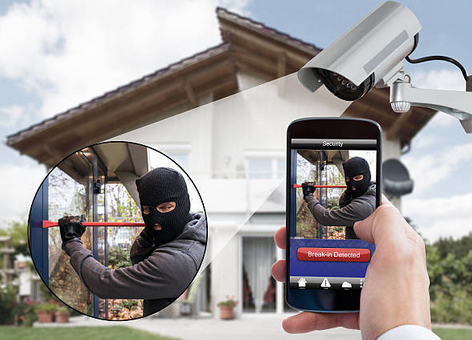


 It is also important to consider the features of the cameras before choosing to use them. As stated before, the technology used in this type of camera tends to improve with time. It is essential to select a camera with features that meet your wants and needs. It can be good video quality or the ability to store large content. Some come with technology that uses them to view live feedback from them by using an app on their phone. Cameras that come with the latest features are expensive. You should be ready to spend more than you initially planned.